

The warning signs usually don't arrive as injury reports first. They show up as the employee who fades by midafternoon, the manager who keeps shifting in a chair during long meetings, the analyst working off a stack of books because the monitor sits too low, or the hybrid employee who uses a dining chair for eight hours and calls it “good enough.”
That's why executive teams often underestimate ergonomics. They treat it as a comfort issue, a facilities line item, or a chair-buying exercise. In practice, it's much broader. Ergonomics is the discipline of designing work so people can perform it safely, efficiently, and sustainably.
For HR leaders and operators, that raises a more strategic question than “Are people comfortable?” The better question is what is the goal of ergonomics when performance, retention, and culture all depend on how work gets done.
The answer matters more in a hybrid workforce. Employees now move between headquarters, home offices, client sites, production floors, and care environments. The physical setup changes. The work pace doesn't. If the job design is poor, people compensate with strain, fatigue, workarounds, and lower-quality output.

The companies that handle this well don't start with furniture catalogs. They start with work design. They ask where effort is wasted, where discomfort breaks concentration, where repetitive tasks create exposure, and where employees make do with a poor setup. That's the point where ergonomics stops being a narrow safety topic and becomes a business lever.
Poor ergonomics rarely looks dramatic at first. It looks like friction, slower work, more fatigue, and employees who have to compensate just to get through the day.
Introduction Beyond Aches and Pains
A modern workplace can look polished and still be poorly designed for human performance. Open-plan offices create glare and noise. Home offices drift into makeshift setups. Conference-heavy days lock employees into static postures. On the floor, a few inches of bad reach distance or awkward lift height can turn routine work into accumulated strain.
Leadership teams often see the symptoms separately. Fatigue gets treated as an engagement issue. Errors get treated as a training issue. Turnover gets treated as a labor market issue. Ergonomics connects those dots because it asks a more operational question: does the work environment support the person doing the work, or does it force the person to adapt around unnecessary strain?
That's why reducing ergonomics to “avoiding back pain” misses the larger value. Good ergonomics protects health, but it also protects focus, consistency, and stamina. Employees who aren't fighting their setup can give more attention to the task itself.
Why leadership should care now
The pressure on workforce performance is different now. Hybrid work has expanded the number of environments leaders are responsible for. Employees may spend one day at a headquarters workstation, another at home, and another in a meeting-heavy setting that offers little movement and poor visual conditions.
A narrow response usually fails. Buying premium chairs without addressing screen position, task design, lighting, work patterns, or employee input tends to produce limited results. Organizations end up spending money while the underlying friction stays in place.
A better approach treats ergonomics as part of operating discipline.
- For HR leaders: it supports retention, absenteeism reduction, and employee experience.
- For finance teams: it helps control claim costs, lost time, and rework.
- For operations leaders: it improves throughput by removing physical barriers to execution.
- For culture leaders: it signals that the company designs work responsibly, not just talks about wellbeing.
The Core Mission of Ergonomics
The simplest useful definition is this: the goal of ergonomics is to fit the task to the person, not force the person to fit the task. That sounds basic, but it changes how leaders evaluate work.
An ergonomic program doesn't start with products. It starts with demands. What does the job ask the body to do? What does it ask the eyes to do? What does it ask the employee to repeat, hold, reach, carry, or concentrate through? Once those demands are visible, the organization can redesign the work so performance is easier to sustain.
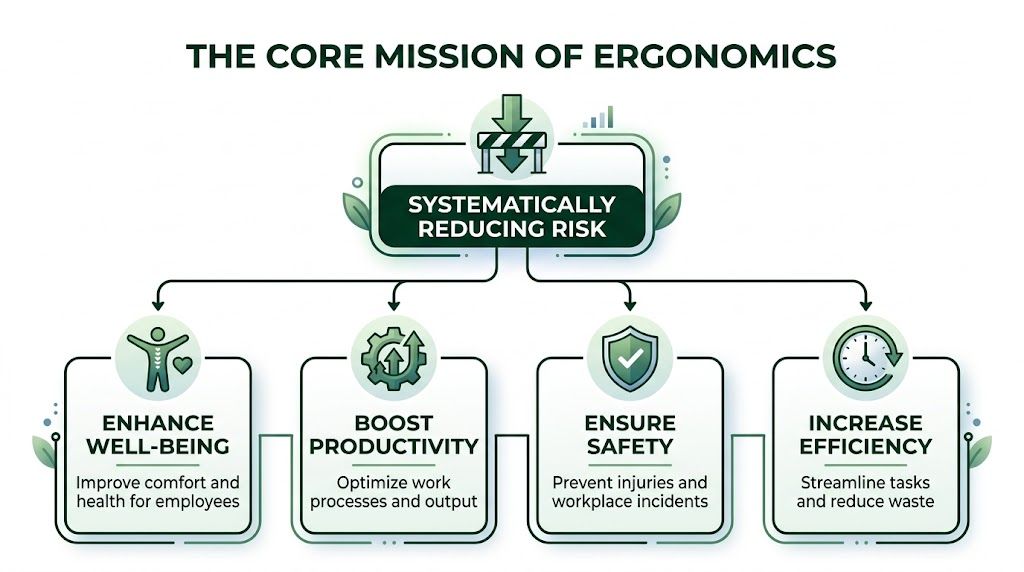
The primary mission is clear. The primary goal of ergonomics is to reduce the risk of work-related musculoskeletal disorders, and OSHA reports that companies implementing ergonomics programs achieve injury reductions of 20% to 60%, while a Washington State DLI meta-analysis reported a 25% average productivity increase after ergonomics adoption.
What fitting work to people actually means
For executives, “fit the job to the person” should translate into practical design choices:
- Adjust the workspace: screens, chairs, tools, and work surfaces should support neutral posture rather than force awkward positioning.
- Reduce unnecessary force and reach: frequently used items should be easy to access without repeated twisting, stretching, or overexertion.
- Match workflows to human capacity: repetitive, high-force, or static tasks need redesign, rotation, or recovery periods.
- Account for variation: workers differ in height, reach, strength, and work context. A fixed setup rarely works for everyone.
That's why ergonomics is best understood as a system, not a product category. One employee may need monitor adjustment and keyboard placement changes. Another may need lifting aids or workflow sequencing changes. A third may need fewer visual distractions and better lighting to reduce strain and maintain quality.
Why the business impact is bigger than safety
Leaders tend to approve ergonomics when injuries become visible. The stronger reason to act is earlier. When work fits the worker, fatigue drops, concentration holds longer, and execution becomes more consistent. Teams don't have to use energy compensating for a poor setup.
Practical rule: If employees need hacks, workarounds, or constant posture adjustments to get through normal tasks, the job design is doing part of the harm.
That's the operating logic behind ergonomics. It preserves people by reducing avoidable stressors, and it preserves performance by removing drag from the work itself.
The Four Pillars of an Ergonomic Workplace
The strongest ergonomics programs rest on four connected pillars: safety, comfort, efficiency, and wellbeing. If one is missing, results usually flatten out. A company can buy compliant equipment and still get weak outcomes if people remain uncomfortable, workflows stay awkward, or mental strain is ignored.
The International Ergonomics Association describes ergonomics as a systems approach. That systems view matters because each pillar reinforces the others. Targeted interventions such as positioning screens at eye level within 15 to 40 degrees below horizontal and keeping elbow angles at 90 to 110 degrees can reduce eye strain by 40% to 50% and upper extremity fatigue by 30%.
Safety
Safety is the pillar most leaders recognize first, and it should be. Poor ergonomic design increases exposure to repetitive motion, awkward posture, overreaching, and unnecessary force. Those exposures accumulate over time, especially in high-volume roles where the same movement happens all day.
In business terms, safety isn't only about compliance. It's about reducing preventable disruption. Every strain, flare-up, or restricted-duty situation creates ripple effects through scheduling, staffing, team morale, and cost control.
A practical safety lens asks questions like these:
- Where does the job force awkward posture
- Which tasks require repeated force without relief
- What tools or materials sit outside an easy reach zone
- Which roles depend on static sitting or standing for too long
Comfort
Comfort gets dismissed too easily because it sounds soft. It isn't. Comfort is what allows sustained concentration. If an employee is dealing with neck tension, wrist pressure, glare, or poor seat support, attention moves away from the work and toward managing discomfort.
That matters in office, lab, and client-facing settings where output quality depends on precision. A workstation that reduces visual and upper-body strain supports longer periods of focused work with fewer self-interruptions.
Comfort isn't a perk. It's a condition for consistent cognitive performance.
Efficiency
Efficiency is where ergonomics becomes easier to explain in executive language. If people have to twist to access tools, reach too far for equipment, reposition materials constantly, or stop because a workstation doesn't match the task, the process is wasting effort.
Good ergonomic design removes those small frictions. The gains often look ordinary on paper. Fewer extra motions. Less time repositioning. Better line of sight. Easier access to supplies. But those ordinary improvements compound across shifts, teams, and work cycles.
For organizations tying ergonomics to broader wellness strategy, physical wellness programs can support the behavior side of the equation, especially when movement, recovery, and workstation habits need reinforcement.
Wellbeing
Wellbeing is the outcome executives often want but don't always connect back to work design. Employees read the environment as a signal. If the company expects high output but ignores obvious physical strain, trust erodes. If the company improves the way work gets done, employees notice.
Wellbeing in ergonomics means more than reduced pain. It includes lower fatigue, better daily energy, fewer distractions from discomfort, and a sense that the organization is serious about sustainable performance. That has implications for morale and retention because people are more likely to stay where the work feels manageable over time.
Translating Ergonomics into Business Outcomes
Ergonomics gets funded when leadership can see the line from intervention to business result. That line is usually stronger than expected. The reason is simple: a better-designed job reduces waste in both human effort and operating cost.
The most credible business case starts with outcomes leaders already track. Claims. productivity. absence. turnover. Work quality. Ergonomics influences all of them when the program addresses real exposure rather than checking a compliance box.
The ROI argument leaders can use
The strongest ROI cases don't rely on a single metric. They combine injury reduction, output improvement, and lower disruption. According to StatPearls from NCBI, ergonomic redesigns such as sit-stand stations can lower low-back disorder incidence by 45% and boost productivity 10% to 15%, while ROI models project a $4 to $6 return per $1 invested in ergonomic training and adjustable furniture.
That doesn't mean every purchase pays back equally. A common mistake is to buy equipment without changing the surrounding work conditions. A chair won't solve poor monitor height, bad task flow, or a schedule that keeps employees static for too long. Return comes from solving the exposure pattern, not from filling the office with premium gear.
The best ergonomics investments remove a barrier to performance. The weakest ones simply decorate the barrier.
A broader workforce strategy matters too. Organizations that pair ergonomic design with movement support, recovery opportunities, and behavior change often create stronger adoption than those that stop at equipment. That's where services like a corporate fitness program can complement ergonomics rather than compete with it.
Ergonomics ROI at a glance
| Ergonomic Intervention | Primary Business Outcome |
|---|---|
| Sit-stand workstation redesign | Lower low-back disorder incidence and improved productivity |
| Adjustable furniture and ergonomic training | Stronger return on investment through reduced strain and better work performance |
| Task redesign to reduce awkward posture | Fewer disruptions caused by fatigue and avoidable physical stress |
| Better screen, keyboard, and reach placement | More consistent focus and less upper-body strain during desk work |
What works and what doesn't
Leaders often ask which interventions create the most value. The answer depends on exposure, but several patterns show up repeatedly.
- What works: targeted redesign of the actual task, employee training on setup and use, and adjustable equipment matched to the workforce.
- What works: combining ergonomic changes with broader wellbeing support so employees can sustain healthy work habits.
- What doesn't: one-time purchases with no assessment, no worker input, and no follow-up.
- What doesn't: treating ergonomics as an office-only issue while ignoring production, healthcare, field, or hybrid roles.
A useful executive test is straightforward. If the proposed intervention changes how work is performed, it has a better chance of producing measurable value. If it only changes how the workplace looks, results will likely be modest.
Ergonomics in Action Workplace Examples
The practical value of ergonomics becomes easier to see when it's tied to real work settings. The exposure differs by environment, but the principle stays the same: reduce unnecessary strain so employees can perform at a high level without burning through physical or mental energy.

In the modern office
A hybrid employee may work from a strong corporate setup three days a week and a poorly arranged home station the other two. The signs often look minor at first: screen glare during afternoon calls, shoulder tension from unsupported arm position, and reduced focus late in the day.
The right response isn't just issuing a chair. It's evaluating the full setup. Screen height, keyboard distance, visual conditions, sitting posture, and movement patterns all matter. In office environments, quality often improves when employees can see clearly, type without wrist strain, and maintain neutral upper-body posture during long periods of focused work.
On the warehouse or manufacturing floor
In industrial environments, ergonomics is often about reach, lift height, repetition, and material flow. A task that requires frequent bending, twisting, or extended reaching might still be completed on schedule, but employees pay for it physically by the end of the shift.
The fix may involve changing workstation height, repositioning frequently used items, reducing carry distance, or reorganizing sequence so the body isn't fighting the process. Leaders sometimes expect one dramatic redesign. More often, results come from several small corrections that remove repeated stress from the same task cycle.
In healthcare settings
Healthcare work combines physical load with pace and unpredictability. Staff may reposition patients, work around fixed room layouts, and document for long stretches between physically demanding tasks. That mix creates a different ergonomic challenge because high-force activity and static computer work can happen in the same shift.
In these environments, the most effective programs respect workflow reality. If a solution slows care delivery or creates extra steps, adoption drops. Good ergonomics in healthcare supports both caregiver safety and clinical flow.
A usable ergonomic solution fits the actual workday. If staff can't apply it under normal operating pressure, it won't last.
How to Implement an Ergonomics Program A Roadmap for Leaders
Most organizations don't need more awareness. They need a disciplined implementation path. The programs that hold up over time are systematic, measurable, and designed with employee input from the start.

For executive buy-in, hard numbers matter. Integrated ergonomics programs in Fortune 500 firms are associated with 22% lower workers' comp claims, and participatory processes that involve workers in hazard identification show 3x higher program success rates.
A practical five-step roadmap
-
Build the case in business terms
Start with the problems leadership already owns: claim costs, fatigue-related disruption, absenteeism, inconsistent output, and retention pressure. Position ergonomics as an operating improvement, not a furniture refresh. -
Run a participatory assessment
Employees know where the work creates strain. Ask them where they compensate, where tasks feel inefficient, and where the setup breaks down during a normal day. Worker participation improves both diagnosis and adoption. -
Prioritize based on exposure and impact
Not every issue needs immediate capital spend. Address the tasks with the highest strain, highest frequency, or clearest business consequence first. Quick wins build confidence. High-risk roles deserve early attention. -
Implement changes with training
Adjustable equipment only works when employees know how to use it and managers reinforce the right habits. This is also the point where digital support can help scale communication, reporting, and behavior change. A digital employee health and wellness platform can support rollout and follow-up across distributed teams. Excel Wellbeing Solutions also offers ergonomic assessments as part of its corporate health services. -
Measure and report outcomes
Track the indicators leadership cares about. Claims trends, absence patterns, employee feedback, productivity markers, and adoption rates all help show whether the program is changing work, not just policy.
Common implementation mistakes
A surprising number of programs stall for predictable reasons:
- Buying before assessing: equipment arrives before the organization knows which tasks create exposure.
- Treating ergonomics as a one-time fix: work changes, teams change, and hybrid routines change. The program needs review.
- Ignoring managers: frontline leaders shape whether employees adjust setups, report issues, and follow new practices.
- Separating ergonomics from wellbeing: if the company promotes health but leaves poor work design untouched, employees notice the contradiction.
The Future of Ergonomics in a Hybrid World
The future of ergonomics is broader than posture and equipment. Hybrid work has made that clear. Employees now face a mix of physical, visual, cognitive, and psychosocial demands across multiple environments, often in the same week.
That shift changes the leadership question. It's no longer enough to ask whether a workstation is technically adjustable. Leaders also need to ask whether the work supports focus, recovery, and sustainable effort. Cognitive overload, poor boundaries, excessive screen time, and fragmented work patterns can intensify physical strain rather than sit apart from it.
A 2025 NIOSH-related report notes that poor ergonomics exacerbates psychosocial risks, with remote workers reporting 25% higher burnout, and that 60% of MSDs in knowledge work now stem from psychosocial stressors. Even as a forward-looking signal, that's an important shift in how leaders should think about risk.
The organizations that adapt will treat ergonomics as part of total work design. That includes physical setup, visual environment, meeting load, task variety, recovery time, and employee voice. In a hybrid workforce, the goal of ergonomics remains the same, but the scope is expanding. It's still about fitting work to people. The difference is that “work” now includes mental load and context as much as furniture and tools.
Excel Wellbeing Solutions helps organizations build workplace wellness strategies that connect employee health with business performance. For leaders evaluating ergonomics as part of a broader wellbeing plan, the next step is to assess where work design is creating avoidable strain, lost focus, and preventable cost, then align those findings with a practical program that employees will utilize.